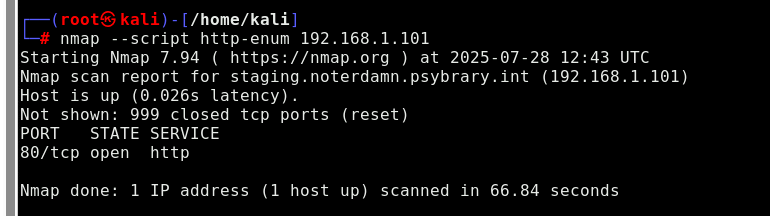
It’s not as straightforward as that 
You need to add the IP of the DNS server discovered with Nmap to the resolv.conf file, then scan the NAME (the full name) of the “staging” server discovered. When you scan this name, Nmap will reveal an IP address not in the 192.168.0.0/23 range. You then use https enum on THAT ip, not 192.168.1.101.
yeah i did that and also with the complete name but it won’t work. When you say this name, you mean stagging.notor… ?
and when you say the dns server ip , you mean 192.168.0.200 or 192.168.1.101 ? i did add those ip addr
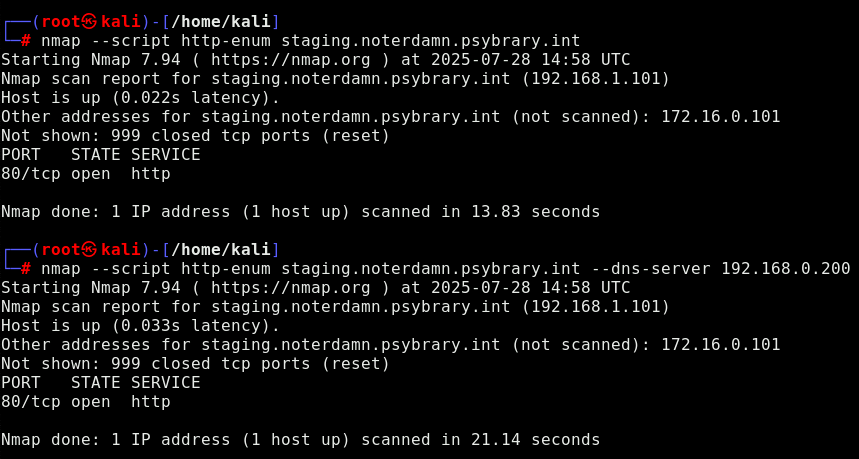
ok i think i got it thx a lot !!!
Did you actually get the name resolution working?? I got to that 2nd IP using a different command line…
I honestly doubt adding the name server to /etc/resolv.conf does anything. Someone on your team should probably review this lab’s instructions - from a machine that’s outside your internal network just in case.
Just ran through the full challenge - editing /etc/resolv.conf worked as expected for me.
This lab uses a single VM running an emulated network (mininet) with containers attached - those are all of the hosts you see in the scope of the lab, including the nameserver. Everything is self-contained on the lab VM, which is in turn isolated from all other lab instances.
That’s all to say, testing this lab from outside our internal network is not possible. We can look at tweaking the language in the challenge a bit, but I was able to complete it as written (and fwiw I don’t think I’ve run through this specific challenge before). Glad to hear you were able to figure it out!
I am surprised that it worked for you. It was not the only odd thing I noticed in that lab, the first question I had to answer in the Tasks section also expected fewer machines to be discovered. Regardless of how off-by-one I might be expected to be as a programmer… I used my fingers to count 5!! Can I really get any lower?
I went through that challenge again today, twice actually. I managed to get stuck with 1 nmap command again while using fiber-optic internet, so this time it can’t have been my fault. I tried again later with the initial connection & this time name resolution worked.
This is the only lab that gave me problems so far, I guess it’s the VM resources.
Just to clarify, your network connection would not have any bearing on the lab environment and what you see in there.
If you could share a screenshot of the issue you encountered, we can look into whether there’s an underlying intermittent issue in the lab.
I don’t have a screenshot as we had to pack up & get moving. Even if I had a screenshot you wouldn’t have much to look at, what happened was an ongoing nmap process just got stuck - after 5 minutes I closed my laptop as it wasn’t the first time it happened in this lab. I guess a poor network connection might manifest this way, but this time it was really not the case.
- Using Nmap, you want to run an NSE script called “http-enum”. What command would you use to execute this script on the 192.168.1.1 host?
(select all that apply)
A. nmap -script=http-enum 192.168.1.1
B. nmap --script=http-enum 192.168.1.1
C. nmap http-enum.nse 192.168.1.1
D. nmap -sC 192.168.1.1
E. nmap -sC.nse 192.168.1.1
F. None of these
what is the answer iam overwhelmed
It looks like F was accidentally marked as one of the correct answers by mistake during our recent update to add individual Submit buttons. This has been fixed.
With that corrected, you should be able to determine the correct answer.
i need a help her for 2 days i cant get it and i passed all the steps
If you’re having trouble with the lab, please share:
-a description of the issue
-the part and step where the issue occurs
-a screenshot of the issue
I have done the challenge 2 times, the second time forgot how to do it, and both times I got stuck in the last step, both times I knew the other IP for the domain, but I just could not get it, and both times I just gave up and then tried another day and got it very easily. I know why now, if you get into the challenge, start clabnet2 and just add the server name to the resolv.conf and then do the final nmap command with just the –script=http-enum and the IP you get the result, if you run it again, you get the result, but the third time the file doesn’t appear, I don’t know if it is a memory problem, but thats why I got stuck and maybe why others get stuck too. You should put a note saying that in case of this happening the user needs to reboot the clabnet. Maybe this just happened to me, but just sharing in case it helps.