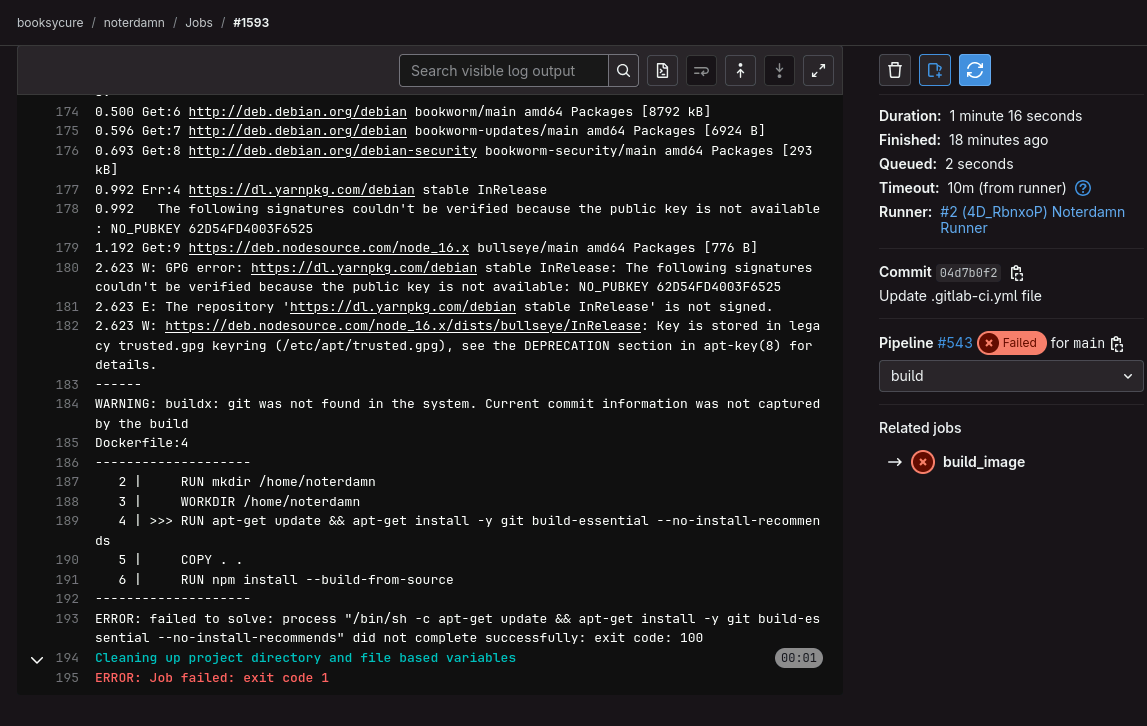
I am trying to complete Part 2. When I run the pipeline, it fails on the stage, “build_image”. I’ve re-run it several times and reloaded the lab with identical results. Here is a screen grab from job.log. Any thoughts?
I have asked the lab author to weigh in 
1 Like
Hey @Bowleskm!
Instructor weighing in here. Verdict is: easily replicated – it’s not you, it’s us.
But, really, it’s the Yarn maintainers.
That GPG key error in your screenshot is the operative issue here. The key was rotated, and because keys aren’t included with the Debian package in this older Yarn release, we weren’t gifted the new one. 
Good news is, I’ve fixed it! My new version isn’t live yet, but I’ve tugged on the relevant shirt sleeves to get this pushed to production, and I suspect it’ll be available tomorrow or the next day. In any case, I’ll update this thread when it is.
More good news: the fix is super simple, so you can apply it yourself if you’re eager to clear this lab. Just replace everything in theDockerfile in the Noterdamn repo with the below code.
FROM nikolaik/python-nodejs:python3.7-nodejs16-slim

RUN mkdir /home/noterdamn
WORKDIR /home/noterdamn

RUN rm -f /etc/apt/sources.list.d/yarn.list \
 && apt-get update \
 && apt-get install -y git build-essential --no-install-recommends \
 && rm -rf /var/lib/apt/lists/*

COPY . .
RUN npm install --build-from-source
ADD https://github.com/ufoscout/docker-compose-wait/releases/download/2.9.0/wait /wait
RUN chmod +x /wait
I’ve also throw it up on Pastebin for 1 week: https://pastebin.com/raw/VZpFrStK
Let me know if you have questions; otherwise, happy hacking!
-Garret
1 Like
1 Like