Hi everyone,
I am currently stuck on the lab “SIEM detection and Alerting”, specifically Question 3.
I have followed the instructions to create a custom local rule in /var/ossec/etc/rules/local_rules.xml to detect RDP logins for the Administrator account. However, when I run the scoring script (sudo ./lab-flag.sh), it keeps failing with the error:
“I do not see the correct field name and user name.”
I have verified the following:
-
The file path is correct:
/var/ossec/etc/rules/local_rules.xml. -
I restarted the manager:
sudo systemctl restart wazuh-manager.service. -
I am running the script with sudo:
sudo ./lab-flag.sh. -
I checked for invisible characters, spaces, and correct casing (
targetUserNamevstargetusername).
I get the text as output:
”I See the correct rule id and level”
”I see the correct parent sid”
”I do not see the correct field name and user name”
This is the content of my local_rules.xml file:
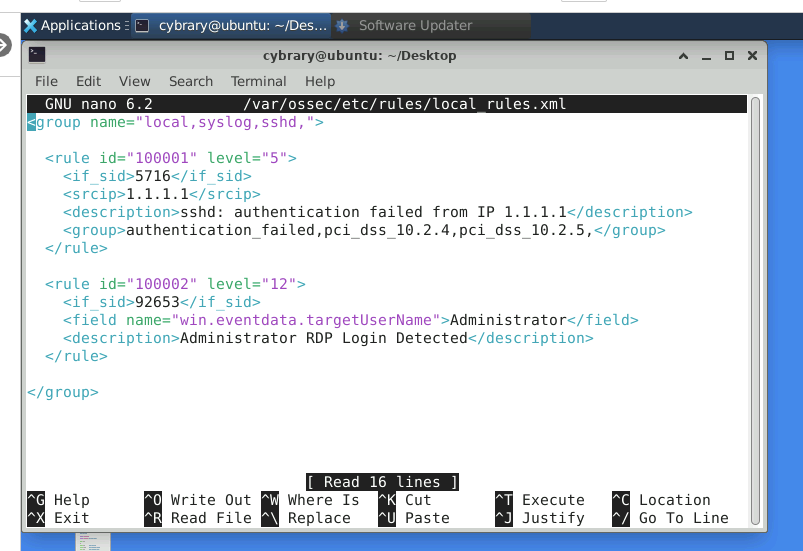
Despite the XML appearing correct and matching the lab instructions, the script does not accept the field name line. I have even tried resetting the lab environment, but the issue persists.
Can anyone help identify why the script is rejecting this configuration?
Thanks!
